
YouTube SEO Optimizer – Complete Guide to Ranking Videos Higher on YouTube YouTube is the second largest search engine in the world. However, simply uploading videos is not enough to gain views, subscribers, and engagement. Proper YouTube SEO is essential…
YouTube SEO Optimizer – Complete Guide to Ranking Videos Higher on YouTube
YouTube is the second largest search engine in the world. However, simply uploading videos is not enough to gain views, subscribers, and engagement. Proper YouTube SEO is essential for increasing visibility and ranking higher in YouTube search results.
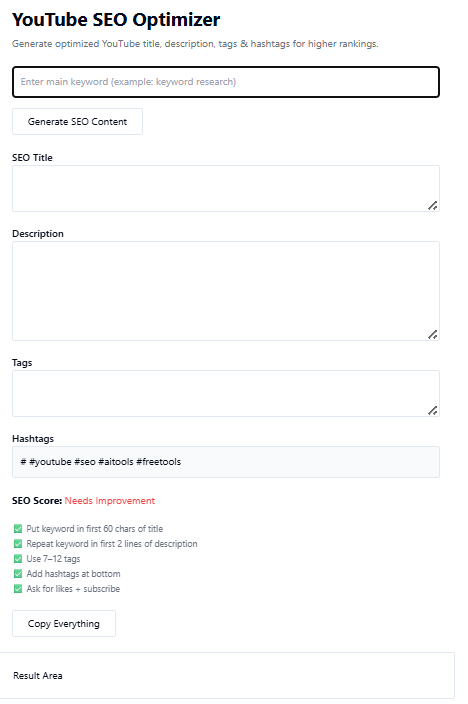
The YouTube SEO Optimizer Tool from TaskHug helps creators, marketers, and businesses optimize video titles, descriptions, and tags to improve discoverability.
Tool URL:
http://taskhug.com/tools/seo-tools/youtube-seo
This guide explains what YouTube SEO is, why it matters, and how to use the tool effectively to grow your channel.
What Is YouTube SEO?
YouTube SEO is the process of optimizing your videos, channel metadata, and engagement signals to rank higher in:
- YouTube search results
- Suggested videos
- Browse features
- Google video search
It involves optimizing:
- Video titles
- Descriptions
- Tags
- Keywords
- Thumbnails
- Watch time
- Engagement metrics
Proper optimization increases both visibility and click-through rate.
Why YouTube SEO Is Important
Optimizing your videos helps:
- Increase organic views
- Improve search ranking on YouTube
- Appear in recommended videos
- Gain more subscribers
- Improve video engagement
- Rank in Google video results
YouTube’s algorithm prioritizes relevance, engagement, and optimization. Without SEO, even high-quality videos may remain undiscovered.
How to Use the YouTube SEO Optimizer (Step-by-Step)
Access the tool here:
http://taskhug.com/tools/seo-tools/youtube-seo
Follow these structured steps:
Step 1: Open the YouTube SEO Optimizer Tool
Visit the TaskHug YouTube SEO Optimizer page in your browser.
Step 2: Enter Your Target Keyword or Topic
In the input field, type the main keyword your video targets.
Example:
- digital marketing tips
- weight loss workout
- tech review 2026
- cooking pasta recipe
Choose keywords that align with your video intent.
Step 3: Add Video Details
Provide relevant video information such as:
- Video title draft
- Short description summary
- Target audience
- Main focus of the video
The more accurate your input, the better the optimization output.
Step 4: Generate SEO Suggestions
Click the “Optimize” or “Generate” button.
The tool analyzes your input and provides:
- Optimized SEO-friendly title suggestions
- Keyword-rich description structure
- Relevant tags
- Hashtag recommendations
- Keyword variations
Step 5: Review and Select Optimized Content
Choose the most relevant optimized suggestions. Ensure the title:
- Includes the primary keyword
- Is compelling and clear
- Avoids keyword stuffing
Ensure the description:
- Contains primary keyword in first 2–3 lines
- Includes related keywords naturally
- Provides context and value
Step 6: Apply Optimization in YouTube Studio
Copy the optimized:
- Title
- Description
- Tags
Paste them into YouTube Studio while uploading or editing your video.
Step 7: Monitor Performance
After publishing:
- Track ranking positions
- Monitor watch time
- Observe click-through rate
- Check engagement metrics
You can also use the Google Rank Tracker tool on TaskHug to monitor keyword visibility trends.
Professional YouTube SEO Framework
To maximize results, follow this structured optimization strategy:
1. Keyword Research First
Identify:
- Search intent
- Long-tail keywords
- Low-competition keywords
- Trending search queries
Use competitor analysis to identify high-performing video topics.
2. Optimize Title Strategically
Best practices:
- Place primary keyword at the beginning
- Keep it under 60 characters if possible
- Make it clear and benefit-driven
Example structure:
Primary Keyword + Benefit + Hook
3. Write SEO-Optimized Description
Structure your description like this:
Paragraph 1:
Include primary keyword naturally.
Paragraph 2:
Add related keywords and explain video value.
Paragraph 3:
Include call-to-action and links.
4. Use Relevant Tags
Tags help YouTube understand context. Include:
- Primary keyword
- Long-tail variations
- Related niche keywords
- Branded tags
Avoid irrelevant tags.
5. Improve Engagement Signals
YouTube ranks videos higher based on:
- Watch time
- Audience retention
- Likes
- Comments
- Shares
Encourage viewers to engage naturally.
6. Optimize Thumbnail Strategy
While not directly handled by the tool, thumbnails strongly impact click-through rate.
Use:
- High contrast colors
- Clear readable text
- Strong emotional expression
- Visual clarity
Internal Linking Strategy for TaskHug
To strengthen SEO authority across your platform, connect the YouTube SEO Optimizer with other relevant TaskHug tools.
Primary Tool:
- YouTube SEO Optimizer
Supporting SEO Tools:
- SEO Competitor Analysis Tool
- Google Rank Tracker
- Keyword Density Checker
- Meta Tag Generator
- Schema Markup Generator
- Backlink Checker
- Broken Link Checker
- Sitemap Generator
- Google Index Checker
- Website Page Speed Checker
Use contextual anchor phrases such as:
- optimize YouTube videos
- analyze competitor strategy
- track keyword rankings
- generate structured data
- improve technical SEO
This builds a strong SEO topic cluster and improves crawl efficiency.
Who Should Use the YouTube SEO Optimizer?
This tool is ideal for:
- YouTube creators
- Digital marketers
- Influencers
- Businesses promoting products
- Agencies managing video marketing
- Educational content creators
- Review and tutorial channels
Anyone aiming to grow YouTube organically can benefit from structured video optimization.
Advanced YouTube SEO Growth Strategy
To maximize performance:
- Target long-tail keywords with lower competition.
- Study top-ranking competitor videos.
- Improve retention through strong hooks in the first 15 seconds.
- Update old video descriptions with optimized keywords.
- Monitor keyword performance regularly.
- Combine SEO optimization with consistent publishing schedule.
YouTube SEO is an ongoing optimization process, not a one-time action.
Conclusion
The TaskHug YouTube SEO Optimizer simplifies video optimization by helping you:
- Create SEO-friendly titles
- Write keyword-optimized descriptions
- Generate relevant tags
- Improve discoverability
- Increase organic views
Start optimizing your videos today:
http://taskhug.com/tools/seo-tools/youtube-seo
When combined with other TaskHug SEO tools, YouTube optimization becomes part of a complete digital growth strategy.

