
XML Sitemap Generator – Complete SEO Indexing Guide An XML sitemap is one of the most important technical SEO files for improving website indexing and search engine visibility. The TaskHug XML Sitemap Generator helps you create structured, search-engine-friendly sitemaps that…
XML Sitemap Generator – Complete SEO Indexing Guide
An XML sitemap is one of the most important technical SEO files for improving website indexing and search engine visibility. The TaskHug XML Sitemap Generator helps you create structured, search-engine-friendly sitemaps that assist Google and other search engines in discovering and indexing your pages faster. Access the tool here: http://taskhug.com/tools/seo-tools/ This guide explains what an XML sitemap is, why it matters for SEO, and how to use the TaskHug XML Sitemap Generator effectively.
What Is an XML Sitemap?
An XML sitemap is a structured file that lists all important URLs of your website. It helps search engines understand your website structure and prioritize crawling. A sitemap typically includes URL location, last modification date, change frequency, and priority value. It acts as a roadmap for search engine bots.
Why XML Sitemaps Are Important for SEO
An optimized XML sitemap improves crawl efficiency, speeds up indexing of new pages, ensures important pages are discovered, supports large websites with many URLs, and improves technical SEO health. Websites with blogs, ecommerce products, or frequently updated content especially benefit from submitting a sitemap to search engines.
Features of TaskHug XML Sitemap Generator
The TaskHug XML Sitemap Generator allows you to add individual page URLs, select change frequency such as daily, weekly, or monthly, assign priority values between 0.0 and 1.0, generate structured XML output instantly, and export your sitemap for deployment. The interface is simple and designed for beginners as well as SEO professionals.
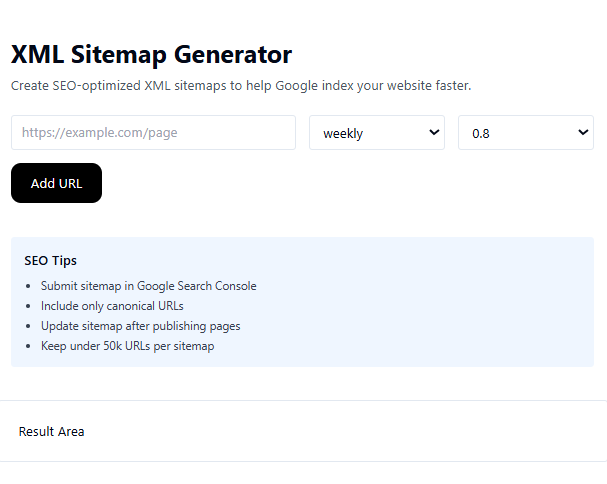
How to Use the XML Sitemap Generator (Based on Your Tool Interface)
Step 1: Enter Page URL. In the URL field, enter the full page address such as https://example.com/page. Always include canonical URLs only.
Step 2: Select Change Frequency. Choose how often the page content changes from the dropdown menu. Options like weekly indicate regular updates.
Step 3: Set Priority Value. Select a priority value such as 0.8. Priority ranges from 0.0 to 1.0, where higher values indicate more important pages.
Step 4: Click Add URL. After entering details, click the “Add URL” button to include the page in your sitemap list.
Step 5: Review Result Area. The generated XML sitemap will appear in the result area. Copy the sitemap code and save it as sitemap.xml.
Step 6: Upload to Root Directory. Upload the sitemap.xml file to your website root directory, for example https://yourwebsite.com/sitemap.xml.
Step 7: Submit to Google Search Console. Submit your sitemap inside Google Search Console to improve indexing speed and monitoring.
SEO Best Practices for XML Sitemap
Submit sitemap in Google Search Console, include only canonical URLs, update sitemap after publishing new pages, keep under 50,000 URLs per sitemap file, avoid including noindex pages, and ensure your sitemap is referenced inside robots.txt.
Common Mistakes to Avoid
Do not include duplicate URLs, do not add non-canonical or redirected pages, avoid incorrect priority values for all pages, do not forget to update sitemap after new content publication, and ensure the sitemap file is publicly accessible.
Who Should Use This Tool?
The TaskHug XML Sitemap Generator is ideal for bloggers, ecommerce website owners, SEO professionals, digital marketers, web developers, and startup founders looking to improve search engine indexing and technical SEO performance.
Conclusion
An XML sitemap is a critical component of technical SEO. Without it, search engines may miss important pages or delay indexing. The TaskHug XML Sitemap Generator simplifies sitemap creation and ensures your website structure is clearly communicated to search engines. Generate your sitemap today at http://taskhug.com/tools/seo-tools/ and improve your website’s crawl efficiency and search visibility.

