
Website Traffic Estimator – Complete Guide to Estimating Competitor & Domain Traffic Understanding how much traffic a website receives is crucial for SEO strategy, competitor research, and digital marketing planning. Whether you are analyzing your own website or evaluating competitors,…
Website Traffic Estimator – Complete Guide to Estimating Competitor & Domain Traffic
Understanding how much traffic a website receives is crucial for SEO strategy, competitor research, and digital marketing planning. Whether you are analyzing your own website or evaluating competitors, traffic estimation provides valuable insights into growth potential and keyword opportunities.
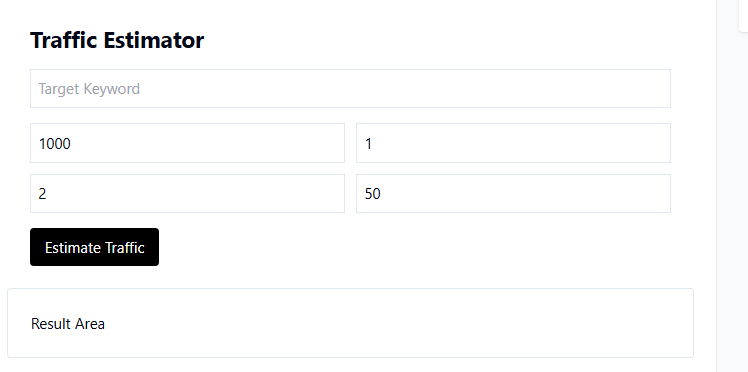
The Website Traffic Estimator Tool from TaskHug helps you analyze estimated website traffic data quickly and efficiently.
Tool URL:
http://taskhug.com/tools/seo-tools/traffic-estimator
This guide explains what traffic estimation is, why it matters for SEO, and how to use the tool effectively to support your digital growth strategy.
What Is a Website Traffic Estimator?
A website traffic estimator analyzes publicly available SEO signals and search data to estimate:
- Monthly organic traffic
- Keyword-based traffic sources
- Traffic trends
- Competitor visibility strength
- Domain performance indicators
While traffic estimation tools provide approximations, they are extremely useful for competitor benchmarking and market analysis.
Why Traffic Estimation Is Important for SEO
Traffic estimation helps you:
- Evaluate competitor strength
- Identify high-traffic domains
- Discover keyword opportunities
- Understand niche demand
- Analyze growth potential
- Plan content and SEO strategies
- Estimate market competition
Without traffic insights, SEO planning becomes speculative.
How to Use the Website Traffic Estimator (Step-by-Step)
Access the tool here:
http://taskhug.com/tools/seo-tools/traffic-estimator
Follow these structured steps:
Step 1: Open the Website Traffic Estimator Tool
Visit the TaskHug Website Traffic Estimator page in your browser.
Step 2: Enter the Website URL
Input the full domain URL you want to analyze.
Example:
https://example.com
You can analyze:
- Your own website
- Competitor websites
- Industry authority sites
Ensure the URL is correct and accessible.
Step 3: Start Traffic Analysis
Click the “Estimate Traffic” or “Analyze” button.
The tool will begin evaluating available SEO and search signals.
Step 4: Automated Traffic Evaluation
The tool analyzes factors such as:
- Ranking keywords
- Search volume estimates
- Domain visibility
- Organic positioning
- Estimated monthly visits
- SEO performance indicators
Step 5: Review Estimated Traffic Data
After processing, the report may include:
- Estimated monthly traffic
- Organic visibility insights
- Keyword-driven traffic indicators
- Domain authority signals
- Comparative performance data
Carefully analyze traffic trends and strengths.
Step 6: Compare With Competitors
Run traffic estimation for:
- Your website
- Top 3–5 competitors
Compare:
- Traffic levels
- Keyword footprint
- SEO visibility
- Authority signals
This reveals your competitive positioning.
Step 7: Build an Action Plan
Based on findings:
- Target high-volume keywords competitors rank for
- Improve content depth
- Strengthen internal linking
- Optimize technical SEO
- Improve domain authority
Re-check traffic periodically to track improvements.
Professional Traffic Analysis Framework
To maximize results, follow this structured evaluation approach:
1. Benchmark Against Competitors
Identify leading websites in your niche and analyze their estimated traffic.
Use the SEO Competitor Analysis Tool to deepen your research.
2. Identify High-Traffic Keyword Opportunities
Traffic often correlates with strong keyword rankings.
Use:
- Google SERP Analyzer
- Google Rank Tracker
to discover ranking gaps and opportunities.
3. Improve On-Page Optimization
Ensure your content is optimized using:
- Keyword Density Checker
- Meta Tag Generator
Strong on-page SEO increases traffic potential.
4. Strengthen Technical SEO
Technical issues can limit traffic growth.
Improve performance using:
- Website Health Checker
- Full SEO Audit Tool
- Website Page Speed Checker
- Broken Link Checker
A technically strong website supports higher rankings.
5. Enhance Authority Signals
Traffic growth often requires stronger domain authority.
Use:
- Backlink Checker
- Domain Authority Checker
to monitor and improve link profile strength.
Internal Linking Strategy for TaskHug
To build a strong SEO topic cluster, connect the Website Traffic Estimator with related TaskHug tools.
Primary Tool:
- Website Traffic Estimator
Supporting Tools:
- SEO Competitor Analysis Tool
- Google SERP Analyzer
- Google Rank Tracker
- Website Health Checker
- Full SEO Audit Tool
- Broken Link Checker
- Schema Markup Generator
- Keyword Density Checker
- Meta Tag Generator
- Backlink Checker
- Domain Authority Checker
- Sitemap Generator
- Google Index Checker
- Website Page Speed Checker
- YouTube SEO Optimizer
Use contextual anchor phrases such as:
- estimate website traffic
- analyze competitor SEO
- track keyword rankings
- improve technical SEO
- perform full SEO audit
- check website health
- generate structured data
This structured internal linking enhances crawl depth and reinforces topical authority.
Who Should Use the Website Traffic Estimator?
This tool is ideal for:
- SEO professionals
- Bloggers
- Digital marketers
- Affiliate marketers
- eCommerce businesses
- Startup founders
- Agencies
- Competitive researchers
Anyone seeking data-driven SEO growth can benefit from traffic estimation analysis.
Advanced Traffic Growth Strategy
To increase your website traffic:
- Analyze competitors with higher traffic.
- Target underserved keywords.
- Create comprehensive, high-value content.
- Improve page speed and technical performance.
- Build authoritative backlinks.
- Optimize structured data.
- Monitor rankings consistently.
- Re-estimate traffic monthly to measure growth.
Traffic growth is the result of consistent optimization and strategic improvements.
Conclusion
The TaskHug Website Traffic Estimator provides valuable insights into domain performance and competitive visibility.
It helps you:
- Estimate organic traffic
- Benchmark competitors
- Identify keyword opportunities
- Plan data-driven SEO strategies
- Track growth potential
Start analyzing website traffic today:
http://taskhug.com/tools/seo-tools/traffic-estimator
When integrated with other TaskHug SEO tools, traffic estimation becomes a powerful component of long-term search engine growth and strategic digital planning.

