
SERP Preview Tool (Advanced) – Optimize Your Search Result Appearance Your page title and meta description directly influence click-through rate (CTR) in search engine results. The TaskHug SERP Preview Tool (Advanced) helps you visualize how your webpage will appear on…
SERP Preview Tool (Advanced) – Optimize Your Search Result Appearance
Your page title and meta description directly influence click-through rate (CTR) in search engine results. The TaskHug SERP Preview Tool (Advanced) helps you visualize how your webpage will appear on Google before publishing. This ensures your SEO title length, meta description length, and URL structure are properly optimized. Access the tool here: http://taskhug.com/tools/seo-tools/ This guide explains what a SERP preview tool is, why it matters for SEO, and how to use the TaskHug SERP Preview Tool effectively.
What Is a SERP Preview Tool?
A SERP Preview Tool allows you to simulate how your website listing appears on search engine results pages (SERP). It shows a live preview of your page title, meta description, URL, and favicon as they would appear in Google search results. This helps prevent title truncation, description cut-offs, and poorly optimized metadata.
Why SERP Preview Matters for SEO
Optimizing your SERP snippet improves click-through rate, enhances search visibility, ensures proper title and description length, avoids pixel truncation, strengthens keyword placement strategy, and improves user engagement. Even if you rank high, a poorly written snippet can reduce traffic.
Features of TaskHug SERP Preview Tool (Advanced)
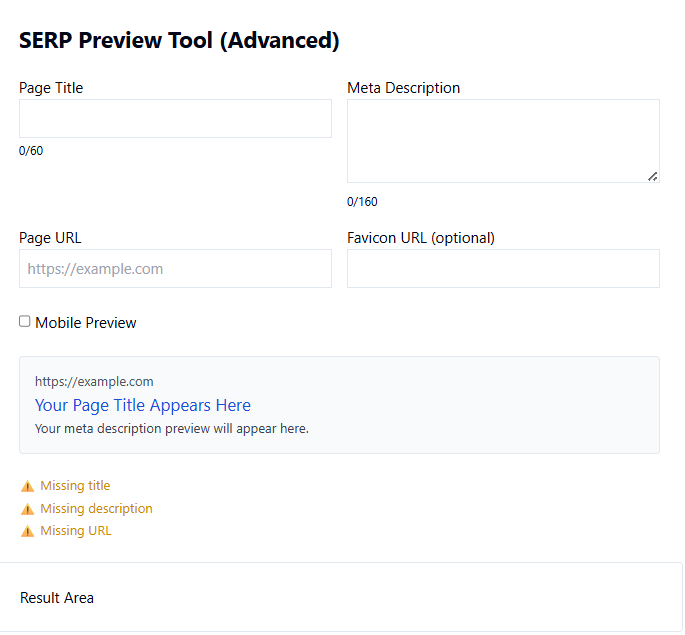
The tool provides page title character counter (0/60), meta description character counter (0/160), page URL input field, optional favicon URL field, mobile preview toggle option, real-time search result simulation, and validation alerts for missing title, description, or URL. It is suitable for SEO professionals, bloggers, content marketers, and website owners.
How to Use the SERP Preview Tool (Based on Your Tool Interface)
Step 1: Enter Page Title. In the “Page Title” field, type your SEO title. Keep it under 60 characters to avoid truncation. The counter will update in real time.
Step 2: Enter Meta Description. In the “Meta Description” field, write a compelling description under 160 characters. This should include primary keywords naturally and encourage clicks.
Step 3: Enter Page URL. Add your full webpage URL in the “Page URL” field. This ensures accurate preview formatting.
Step 4: Add Favicon URL (Optional). You can enter a favicon image URL to simulate brand appearance in search results.
Step 5: Enable Mobile Preview. Check the “Mobile Preview” option to see how your listing appears on mobile devices. Mobile optimization is critical for SEO performance.
Step 6: Review Live Preview. The tool instantly displays how your search result snippet will appear, including title formatting and description layout.
Step 7: Check Validation Alerts. If title, description, or URL is missing, warning alerts will appear. Resolve these before publishing.
SEO Best Practices for SERP Optimization
Keep titles between 50–60 characters, keep meta descriptions between 140–160 characters, place primary keywords near the beginning of the title, write compelling call-to-action phrases, avoid keyword stuffing, maintain brand consistency, and ensure the URL is clean and readable.
Common Mistakes to Avoid
Avoid writing overly long titles, using duplicate meta descriptions across pages, ignoring mobile preview, stuffing keywords unnaturally, or leaving metadata fields empty. Each page should have unique and optimized metadata.
Who Should Use This Tool?
The TaskHug SERP Preview Tool (Advanced) is ideal for SEO specialists, bloggers, ecommerce store owners, digital marketers, content creators, and web developers looking to improve organic click-through rate and search performance.
Conclusion
Ranking on Google is only half the strategy. The other half is maximizing clicks. A properly optimized title and meta description significantly increase user engagement and traffic. The TaskHug SERP Preview Tool (Advanced) allows you to refine your search snippet before going live, ensuring professional presentation and improved SEO results. Start optimizing your search appearance today at http://taskhug.com/tools/seo-tools/ and increase your website’s visibility and click-through performance.

