
Schema Markup Generator – Complete Guide to Structured Data for Higher Search Rankings Search engines rely on structured data to better understand website content. If you want enhanced visibility in Google search results through rich snippets, featured results, FAQs, and…
Schema Markup Generator – Complete Guide to Structured Data for Higher Search Rankings
Search engines rely on structured data to better understand website content. If you want enhanced visibility in Google search results through rich snippets, featured results, FAQs, and knowledge panels, implementing schema markup is essential.
The Schema Markup Generator Tool by TaskHug helps you create structured data code easily without technical expertise.
Tool URL:
http://taskhug.com/tools/seo-tools/schema-generator
This guide explains what schema markup is, why it matters for SEO, and how to generate and implement structured data correctly using the tool.
What Is Schema Markup?
Schema markup is structured data added to a webpage’s HTML to help search engines understand the context of your content.
It allows search engines to interpret:
- Business details
- Product information
- Reviews and ratings
- Articles and blog posts
- FAQs
- Events
- Recipes
- Local business data
Schema markup increases your chances of earning rich results in search engine results pages (SERPs).
Why Schema Markup Is Important for SEO
Proper structured data implementation can:
- Improve click-through rate (CTR)
- Enable rich snippets
- Enhance search visibility
- Support voice search optimization
- Help Google better interpret your content
- Improve local SEO performance
While schema markup is not a direct ranking factor, it significantly improves how your content appears in search results.
How to Use the Schema Markup Generator (Step-by-Step)
Access the tool here:
http://taskhug.com/tools/seo-tools/schema-generator
Follow these structured steps:
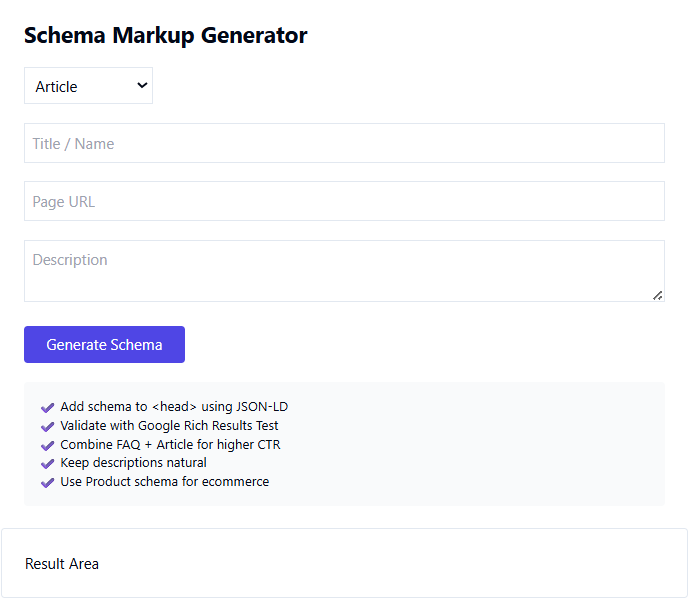
Step 1: Open the Schema Markup Generator Tool
Visit the TaskHug Schema Generator page in your browser.
Step 2: Select Schema Type
Choose the appropriate schema type based on your content. Common options include:
- Article
- Blog Posting
- FAQ
- Product
- Local Business
- Organization
- Event
- Recipe
Select the one that matches your page intent.
Step 3: Fill in Required Information
Enter the relevant details depending on schema type. For example:
For Article Schema:
- Headline
- Author name
- Publication date
- Featured image URL
- Description
For Product Schema:
- Product name
- Description
- Price
- Currency
- Availability
- Brand
For FAQ Schema:
- Question
- Answer
Ensure all information is accurate and matches visible page content.
Step 4: Generate Schema Code
Click the “Generate Schema” button.
The tool will create structured data in JSON-LD format, which is Google’s recommended implementation method.
Step 5: Copy the Generated Code
Copy the generated JSON-LD code snippet provided by the tool.
Step 6: Add Schema to Your Website
Paste the generated code inside the <head> section of your webpage HTML, or add it using:
- CMS header settings
- Theme header file
- SEO plugin custom schema field
Ensure it is placed correctly without breaking existing code.
Step 7: Validate the Schema
After implementation:
- Use Google’s Rich Results Test
- Validate using structured data testing tools
- Check for errors or warnings
Fix any validation issues immediately.
Structured Data Implementation Best Practices
To maximize SEO benefits, follow this professional framework:
1. Match Schema With Page Intent
Do not add irrelevant schema types. If it’s a blog post, use Article schema. If it’s a product page, use Product schema.
2. Ensure Content Consistency
Structured data must match visible page content. Mismatched data may result in penalties or ignored markup.
3. Use JSON-LD Format
JSON-LD is preferred because it is cleaner, easier to manage, and recommended by Google.
4. Avoid Overuse of Schema
Do not spam schema types. Use only what enhances clarity and relevance.
5. Regularly Update Schema Data
Update structured data when:
- Prices change
- Product availability changes
- Event dates change
- Articles are updated
SEO Benefits of Using Schema Markup Generator
Using the TaskHug Schema Generator helps:
- Improve SERP appearance
- Increase organic click-through rate
- Enhance search engine understanding
- Improve local business visibility
- Enable FAQ rich results
- Support eCommerce optimization
Structured data improves how your listing stands out compared to competitors.
Internal Linking Strategy for TaskHug
To strengthen topical authority and SEO clusters, connect Schema Markup Generator with other relevant TaskHug tools.
Primary Tool:
- Schema Markup Generator
Supportive SEO Tools:
- SEO Competitor Analysis Tool
- Google Rank Tracker
- Broken Link Checker
- Keyword Density Checker
- Meta Tag Generator
- Backlink Checker
- Domain Authority Checker
- Sitemap Generator
- Google Index Checker
- Website Page Speed Checker
Use contextual anchor text such as:
- generate structured data
- improve search visibility
- track keyword rankings
- analyze competitor SEO
- fix broken links
- optimize meta tags
This structured internal linking improves crawl depth and reinforces SEO tool authority.
Who Should Use the Schema Markup Generator?
This tool is ideal for:
- Bloggers
- SEO professionals
- Digital marketers
- E-commerce store owners
- Local businesses
- Agencies
- Website developers
Anyone aiming to improve search result presentation should implement schema markup.
Advanced Schema Optimization Strategy
To maximize impact:
- Combine FAQ schema with long-form blog content.
- Use Product schema on transactional pages.
- Add Local Business schema for location-based SEO.
- Monitor ranking changes using a rank tracking tool.
- Improve technical SEO alongside structured data.
Schema works best when combined with:
- Strong on-page optimization
- High-quality content
- Technical SEO health
- Backlink growth
Conclusion
Structured data is essential for modern SEO. The TaskHug Schema Markup Generator simplifies implementation by allowing you to:
- Generate accurate JSON-LD code
- Improve rich snippet eligibility
- Enhance SERP appearance
- Increase click-through rate
- Strengthen overall SEO strategy
Start generating structured data today:
http://taskhug.com/tools/seo-tools/schema-generator
When integrated with other TaskHug SEO tools, schema implementation becomes a powerful component of your long-term organic growth strategy.

