
Robots.txt Generator – Complete SEO Control Guide A properly configured robots.txt file is essential for controlling how search engines crawl and index your website. The TaskHug Robots.txt Generator helps you create accurate, search-engine-friendly robots.txt rules instantly without manual coding. Access…
Robots.txt Generator – Complete SEO Control Guide
A properly configured robots.txt file is essential for controlling how search engines crawl and index your website. The TaskHug Robots.txt Generator helps you create accurate, search-engine-friendly robots.txt rules instantly without manual coding. Access the tool here: http://taskhug.com/tools/seo-tools/ This guide explains what robots.txt is, why it matters for SEO, and how to use the TaskHug Robots.txt Generator effectively.
What Is a Robots.txt File?
A robots.txt file is a simple text file placed in your website’s root directory that instructs search engine bots which pages or folders they can or cannot crawl. Example:
User-agent: *
Allow: /
Disallow: /admin
This tells search engines to crawl everything but avoid the /admin folder.
Why Robots.txt Is Important for SEO
A properly configured robots.txt file helps you prevent indexing of sensitive directories, avoid duplicate content issues, improve crawl budget efficiency, protect admin and backend folders, guide search engines toward important pages, and include your sitemap for faster indexing. Incorrect configuration can accidentally block important pages from being indexed.
Features of TaskHug Robots.txt Generator
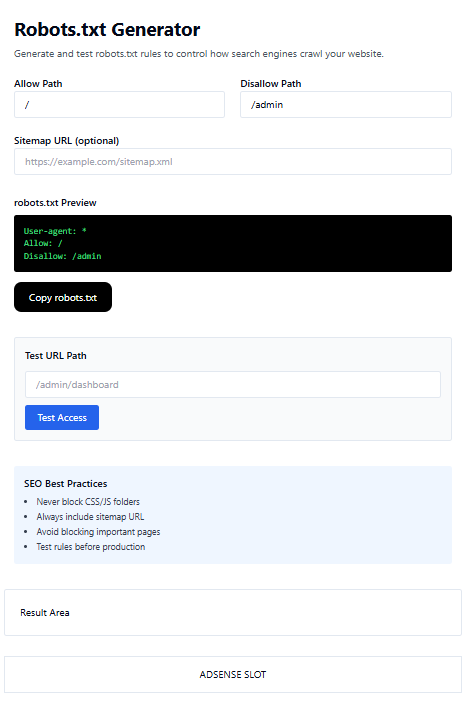
The TaskHug Robots.txt Generator provides allow path configuration, disallow path configuration, optional sitemap URL field, live robots.txt preview, copy robots.txt button, URL path testing feature, and built-in SEO best practices reminders. It is ideal for website owners, bloggers, developers, and SEO professionals.
How to Use the Robots.txt Generator
Step 1: Set Allow Path. In the “Allow Path” field, enter “/” to allow full website crawling or specify a folder you want bots to crawl.
Step 2: Set Disallow Path. In the “Disallow Path” field, enter folders you want to block such as “/admin” or other private areas.
Step 3: Add Sitemap URL (Optional but Recommended). Enter your sitemap URL like https://yourwebsite.com/sitemap.xml to improve indexing speed and crawl efficiency.
Step 4: Review robots.txt Preview. The tool automatically generates a preview so you can verify rules before deployment.
Step 5: Copy robots.txt. Click the “Copy robots.txt” button, paste it into a file named robots.txt, and upload it to your website root directory such as https://yourwebsite.com/robots.txt.
Step 6: Test URL Path. Use the “Test URL Path” section to enter a path like /admin/dashboard and click “Test Access” to verify whether the path is allowed or blocked.
SEO Best Practices for Robots.txt
Never block CSS or JS folders, always include your sitemap URL, avoid blocking important landing pages, test rules before production, keep syntax clean and minimal, and use only one robots.txt file.
Common Mistakes to Avoid
Avoid blocking the entire site using “Disallow: /”, blocking important product or blog pages, forgetting to include a sitemap, using incorrect folder paths, or uploading robots.txt in the wrong directory.
Who Should Use This Tool?
The TaskHug Robots.txt Generator is perfect for SEO specialists, web developers, bloggers, ecommerce website owners, digital marketers, and startup founders.
Conclusion
Your robots.txt file controls how search engines interact with your website. A small mistake can impact visibility and rankings. The TaskHug Robots.txt Generator simplifies the process and ensures proper crawl management and SEO compliance without manual configuration. Generate your robots.txt file today at http://taskhug.com/tools/seo-tools/ and take full control of your website’s search engine crawling strategy.

