
Meta Tag Generator – Create SEO Meta Tags Instantly (Advanced) Meta tags play a critical role in search engine optimization. They help search engines understand your webpage and improve how your site appears in search results. A Meta Tag Generator…
Meta Tag Generator – Create SEO Meta Tags Instantly (Advanced)
Meta tags play a critical role in search engine optimization. They help search engines understand your webpage and improve how your site appears in search results.
A Meta Tag Generator allows you to create properly structured SEO meta tags including title, description, keywords, canonical URL, robots directives, and JSON-LD schema markup without writing manual code.
Generate SEO meta tags instantly here:
http://taskhug.com/tools/seo-tools/
What is a Meta Tag Generator?
A Meta Tag Generator is an online SEO tool that helps website owners create:
- SEO-optimized title tags
- Meta descriptions
- Meta keywords
- Canonical tags
- Robots meta directives
- Twitter meta tags
- JSON-LD structured data
Instead of manually writing HTML meta code, the generator creates ready-to-copy tags instantly.
Why Meta Tags Are Important for SEO
Meta tags directly influence:
search-engine-visibility
Search engines use meta tags to understand page content.
click-through-rate
A strong meta description improves CTR from search results.
indexing-control
Robots meta tags control whether a page is indexed or followed.
duplicate-content-prevention
Canonical tags prevent duplicate content issues.
structured-data-support
JSON-LD improves search result appearance with rich snippets.
Proper meta tags improve technical SEO and ranking potential.
Features of TaskHug Meta Tag Generator (Advanced)
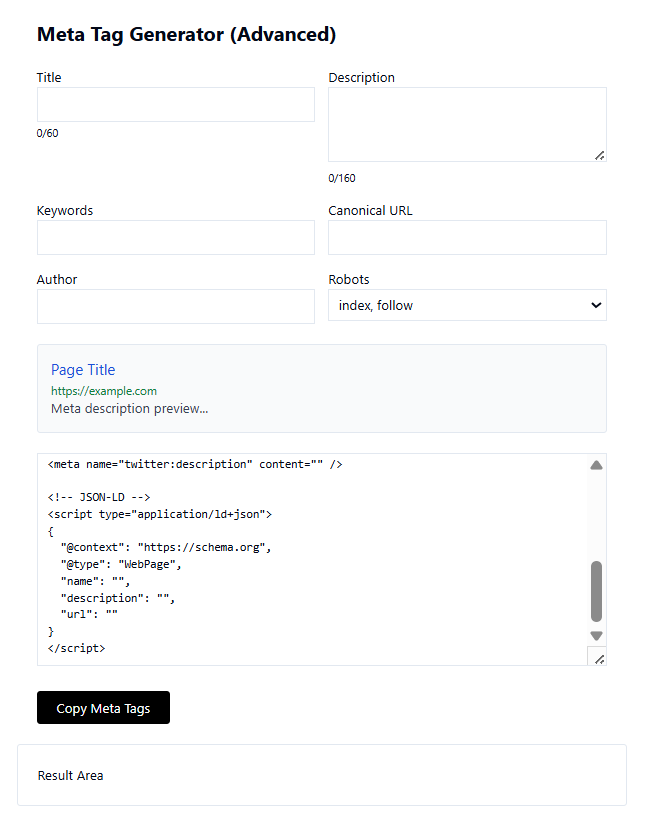
Based on the interface shown in the tool, you can generate:
- Title (with character counter)
- Meta Description (with 160-character preview counter)
- Keywords field
- Canonical URL
- Author meta tag
- Robots directive (index, follow options)
- Twitter description meta tag
- JSON-LD structured data (WebPage schema)
- Live preview section
- Copy meta tags button
- Result output area
This makes it a complete on-page SEO meta tag builder.
Use it here:
http://taskhug.com/tools/seo-tools/
How to Use the Meta Tag Generator (Step-by-Step Guide)
Based on the interface shown in your uploaded image:
Step 1: Enter Page Title
Add your SEO title in the Title field.
Keep it within 60 characters for best SEO performance.
The tool shows a character counter below the field.
Step 2: Add Meta Description
Write a compelling meta description (up to 160 characters).
The character counter helps you stay within optimal length.
Step 3: Add Keywords
Enter relevant SEO keywords separated by commas.
Although not heavily weighted by modern search engines, keywords still help in content clarity.
Step 4: Add Canonical URL
Enter the original URL of the page to avoid duplicate content issues.
Step 5: Enter Author Name
Add the content author for better metadata structuring.
Step 6: Select Robots Directive
Choose options like:
- index, follow
- noindex
- nofollow
This controls search engine crawling behavior.
Step 7: Review Live Preview
The preview section shows how your page title and meta description may appear in search results.
Step 8: Copy Generated Meta Tags
Click the “Copy Meta Tags” button to copy all generated HTML meta code including JSON-LD schema.
Step 9: Paste into Your Website
Place the generated meta tags inside the <head> section of your webpage.
What is Included in the Generated Code?
The tool automatically generates:
- Standard meta tags
- Twitter meta description
- JSON-LD structured data using schema.org WebPage format
Example structure generated:
- Title tag
- Meta description
- Canonical link
- Robots tag
- Author tag
- Twitter meta tag
- JSON-LD script block
This ensures technical SEO compliance.
Who Should Use This Meta Tag Generator?
This tool is ideal for:
- Bloggers
- Website owners
- SEO professionals
- Digital marketers
- E-commerce store owners
- Developers
- Content creators
Anyone managing website content should optimize meta tags properly.
Benefits of Using an Online Meta Tag Generator
saves-time
No need to manually write HTML code.
error-free-code
Prevents syntax mistakes in meta tags.
seo-optimized-output
Built for search engine best practices.
structured-data-ready
Includes JSON-LD schema markup.
beginner-friendly
No technical coding knowledge required.
Best Practices for Writing SEO Meta Tags
- Keep title under 60 characters
- Keep description under 160 characters
- Include primary keyword naturally
- Avoid keyword stuffing
- Write compelling and click-worthy descriptions
- Always use canonical URLs
- Use correct robots directives
Why Choose TaskHug Meta Tag Generator?
TaskHug provides fast, secure, and user-friendly SEO tools for website optimization.
Advantages include:
- Clean interface
- Real-time preview
- Character limit guidance
- JSON-LD schema generation
- One-click copy feature
- Free access
- No registration required
It is designed for both beginners and advanced SEO professionals.
Start generating meta tags here:
http://taskhug.com/tools/seo-tools/
Conclusion
A Meta Tag Generator is an essential SEO tool for improving search engine visibility, indexing control, and click-through rates. Proper meta tags enhance your website’s technical SEO foundation and help search engines understand your content better.
Use the TaskHug Meta Tag Generator to create professional, optimized, and structured meta tags instantly.
Generate your meta tags now:
http://taskhug.com/tools/seo-tools/

