
Local SEO Rank Tracker – Monitor Local Keyword Rankings & Improve Visibility Local search visibility is critical for businesses targeting specific cities, regions, or service areas. Whether you run a local service company, agency, or brick-and-mortar store, tracking your local…
Local SEO Rank Tracker – Monitor Local Keyword Rankings & Improve Visibility
Local search visibility is critical for businesses targeting specific cities, regions, or service areas. Whether you run a local service company, agency, or brick-and-mortar store, tracking your local keyword performance is essential. A Local SEO Rank Tracker helps you monitor how your website ranks in location-based search results.
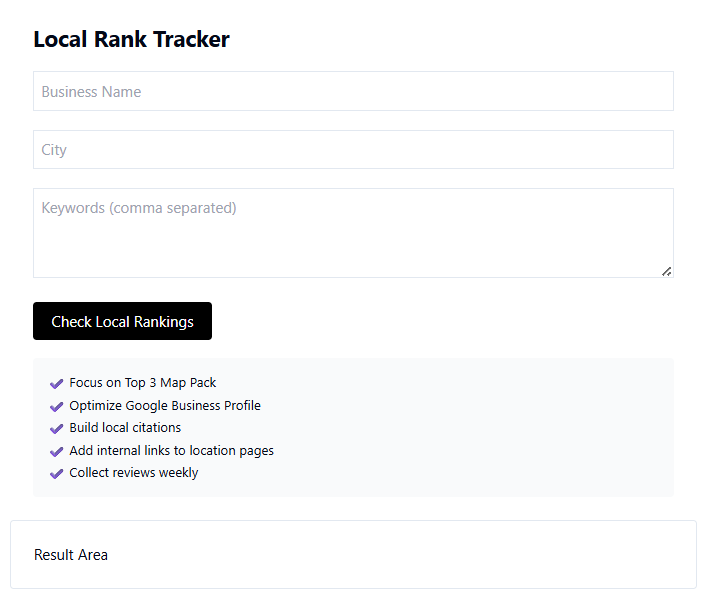
The Local SEO Rank Tracker Tool at
http://taskhug.com/tools/seo-tools/local-rank-tracker
is designed to help businesses track rankings for geo-targeted keywords and improve local SEO strategy.
This professional guide explains what local rank tracking is, why it matters, and how to use the TaskHug tool step by step.
What is Local SEO Rank Tracking?
Local SEO rank tracking monitors how your website ranks in search engine results for keywords that include location modifiers such as:
- “near me”
- City names
- State or region names
- Area-based service queries
It helps you understand your visibility in:
- Local organic results
- Map listings
- Geo-specific search queries
Tracking local rankings allows you to optimize content and improve regional visibility.
Why Local Rank Tracking is Important
Local competition is highly targeted. Even if you rank nationally, your business may not rank in specific cities.
Local rank tracking helps you:
- Measure city-level keyword performance
- Identify ranking fluctuations
- Compare local competitors
- Improve location-based pages
- Optimize Google Business listings
- Increase local traffic and conversions
Without tracking, you cannot measure local SEO effectiveness.
How to Use TaskHug Local SEO Rank Tracker (Step-by-Step Guide)
Follow these steps to monitor your local keyword rankings:
Step 1: Visit the Tool Page
Open the official tool:
http://taskhug.com/tools/seo-tools/local-rank-tracker
Step 2: Enter Your Website URL
Input your domain or specific landing page URL.
Step 3: Add Local Keywords
Enter keywords including location modifiers, such as:
- “plumber in Delhi”
- “digital marketing agency Mumbai”
- “best gym in Bangalore”
Add multiple keywords if supported.
Step 4: Select Target Location
Choose the city, region, or country where you want to track rankings.
Step 5: Click “Track Rankings”
Start the local rank analysis.
Step 6: Review Ranking Report
The tool provides:
- Current local keyword positions
- Ranking changes
- Location-based visibility insights
- SEO performance suggestions
Step 7: Optimize Based on Data
Improve your rankings by:
- Enhancing local landing pages
- Adding location-specific content
- Improving internal linking
- Optimizing page speed
- Building local backlinks
Re-check rankings regularly to monitor improvements.
Best Practices for Local SEO Optimization
To improve local rankings:
- Create dedicated location pages
- Use local keywords naturally in headings
- Add structured data (schema markup)
- Optimize Google Business Profile
- Build citations and local backlinks
- Improve mobile performance
You can combine this tool with other TaskHug SEO tools:
- Google Rank Tracker
http://taskhug.com/tools/seo-tools/google-rank-tracker - SEO Competitor Analysis Tool
http://taskhug.com/tools/seo-tools/competitor-analysis - Website Health Checker
http://taskhug.com/tools/seo-tools/website-health-checker - Content Gap Analyzer
http://taskhug.com/tools/seo-tools/content-gap-analyzer - Internal Link Builder
http://taskhug.com/tools/seo-tools/internal-link-builder
Together, these tools build a complete local SEO strategy.
Internal Linking Strategy for TaskHug
To strengthen domain authority across TaskHug:
1. Connect All SEO Tools
Each SEO guide should internally link to:
- Local SEO Rank Tracker
- Google Rank Tracker
- Google SERP Analyzer
- Website Traffic Estimator
- Backlink Checker
- Domain Authority Checker
- Broken Link Checker
- Schema Markup Generator
- Programmatic SEO Page Generator
- Affiliate SEO Analyzer
This builds a strong SEO tools cluster.
2. Promote Utility Tools Contextually
Within blog content, include contextual links to:
- Image Compressor (optimize local landing page images)
- Video Trimmer (optimize local promotional videos)
- EMI Calculator (finance niche local services)
- BMI Calculator (health-based local businesses)
- YouTube SEO Optimizer (local video marketing)
This enhances cross-category internal linking.
3. Use Keyword-Focused Anchors
Examples:
- “track local keyword rankings”
- “monitor city-level SEO performance”
- “improve local search visibility”
- “analyze competitor rankings locally”
Avoid generic anchor phrases.
Who Should Use Local SEO Rank Tracker?
This tool is ideal for:
- Local businesses
- Service providers
- Multi-location brands
- Franchises
- Digital marketing agencies
- Real estate businesses
- Healthcare providers
- Restaurants and retail stores
If you target customers in specific geographic areas, this tool is essential.
Common Local SEO Mistakes to Avoid
- Not creating dedicated city pages
- Ignoring mobile optimization
- Using duplicate content across locations
- Failing to track keyword performance
- Not optimizing internal linking
Local SEO requires consistent tracking and strategic optimization.
How Local Rank Tracking Improves Business Growth
When you consistently track and optimize local rankings:
- You increase local search visibility
- You attract qualified nearby customers
- You improve conversion rates
- You strengthen brand presence in specific cities
- You outperform local competitors
Data-driven local SEO leads to measurable business growth.
Conclusion
The Local SEO Rank Tracker is a powerful tool for businesses that want to dominate city-based search results and attract local customers.
Start tracking your local keyword performance today using:
http://taskhug.com/tools/seo-tools/local-rank-tracker
Combine it with other TaskHug SEO and productivity tools to build a complete optimization ecosystem that drives consistent local traffic and long-term business growth.

