
Google Keyword Rank Tracker – Complete Professional Guide for Accurate SEO Monitoring Search engine visibility is one of the most valuable digital assets for any website. Whether you run a blog, business website, eCommerce store, or a free tools platform…
Google Keyword Rank Tracker – Complete Professional Guide for Accurate SEO Monitoring
Search engine visibility is one of the most valuable digital assets for any website. Whether you run a blog, business website, eCommerce store, or a free tools platform like TaskHug, tracking your keyword rankings is essential for sustainable growth.
The Google Keyword Rank Tracker helps you monitor your website’s position on Google for targeted search terms. If you are using the TaskHug SEO tool, this guide will walk you through:
- What keyword rank tracking is
- Why it matters
- How to use the TaskHug tool correctly
- How to improve your rankings
- How to integrate rank tracking with other TaskHug tools
- Internal linking strategy for SEO growth
Tool URL:
http://taskhug.com/tools/seo-tools/google-rank-tracker
What Is a Google Keyword Rank Tracker?
A Google Keyword Rank Tracker is an SEO tool that checks where your website appears in Google search results for specific keywords.
For example, if you target:
- “free image compressor”
- “online bmi calculator”
- “emi calculator India”
The rank tracker tells you whether your website appears on:
- Page 1 (positions 1–10)
- Page 2 (positions 11–20)
- Or beyond
Tracking keyword rankings allows you to measure SEO performance, identify growth opportunities, and optimize your content strategically.
Why Keyword Rank Tracking Is Important
1. Measure SEO Performance
You can track whether your optimization efforts are improving rankings.
2. Identify High-Opportunity Keywords
If a keyword is ranking at position 11–15, it is close to page one. These are high-priority keywords for optimization.
3. Monitor Competitiveness
Ranking fluctuations indicate competition changes and algorithm updates.
4. Improve ROI
Better rankings = higher traffic = more conversions.
For a multi-tool website like TaskHug, tracking keywords such as:
- BMI calculator online
- free image compressor
- online video trimmer
- emi calculator India
is critical to growing organic traffic.
How to Use the TaskHug Google Rank Tracker (Step-by-Step Guide)
Tool URL:
http://taskhug.com/tools/seo-tools/google-rank-tracker
Follow these professional steps to use the tool effectively:
Step 1: Open the Google Rank Tracker Page
Navigate to:
http://taskhug.com/tools/seo-tools/google-rank-tracker
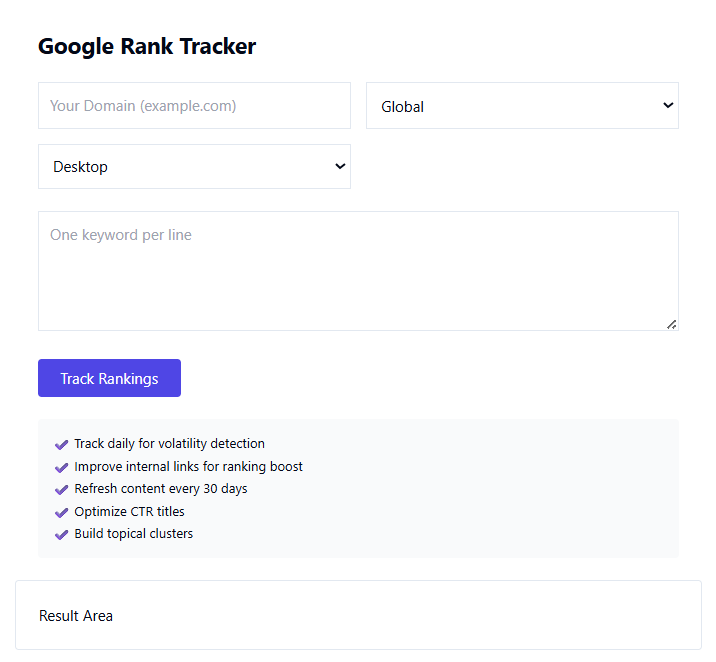
You will see the input fields for domain and keywords.
Step 2: Enter Your Website URL
In the Website URL field:
- Enter your full domain
Example:
https://www.taskhug.com
Best practice:
- Always use the correct protocol (https)
- Avoid adding extra spaces
- Use the exact version indexed by Google
Step 3: Enter Target Keywords
In the keyword input section:
- Add one keyword per line
- Or separate multiple keywords using commas (as supported)
Example keyword set for TaskHug:
- free bmi calculator
- image compressor online
- video trimmer free
- emi calculator India
- pdf converter online
Choose keywords that:
- Have search demand
- Match your page content
- Reflect user intent
Step 4: Select Location (If Available)
If the tool provides a country selection:
- Choose India if targeting Indian users
- Choose USA, UK, or global markets if applicable
Location-based tracking ensures accurate ranking data.
Step 5: Click “Track Ranking” or “Check Rank”
After entering your domain and keywords:
- Click the action button
- Allow the tool to process
The system will analyze Google search results and detect your ranking position for each keyword.
Step 6: Analyze Ranking Results
The results typically include:
- Keyword
- Ranking position
- Ranking URL
- Visibility insights
Focus on:
- Keywords ranking 1–10 (maintain and protect)
- Keywords ranking 11–20 (optimize aggressively)
- Keywords beyond 20 (rework content and internal linking)
Step 7: Optimize Based on Results
After reviewing rankings:
- Improve on-page SEO
- Add structured headings
- Improve keyword placement
- Strengthen internal linking
- Increase page speed
- Add supporting blog content
SEO Optimization Strategy for TaskHug Tools
If you want to promote all TaskHug tools through this guide post, you must strategically connect keyword tracking with your tool ecosystem.
Below is a professional internal linking strategy.
Internal Linking Strategy for TaskHug
When writing blog content about SEO, calculators, or productivity tools, link naturally to related TaskHug tools using contextual anchors.
Core SEO Tools Cluster
Primary Tool:
Google Rank Tracker
http://taskhug.com/tools/seo-tools/google-rank-tracker
Future Related SEO Tools (Cluster Model):
- Google Index Checker
- Keyword Density Checker
- Backlink Checker
- Meta Tag Analyzer
Create a central SEO hub page linking to all SEO tools.
Productivity & Utility Tools Cluster
Inside your SEO guide, when discussing optimization, mention practical tools users may need.
Health & Finance Tools
If discussing niche keywords like “bmi calculator” or “emi calculator,” link contextually:
- BMI Calculator
https://www.taskhug.com/tools/bmi-calculator - EMI Calculator
https://www.taskhug.com/tools/emi-calculator
Example contextual usage:
“If you are targeting keywords like online bmi calculator, ensure your page for the BMI Calculator tool is optimized for search intent.”
Image Optimization Tools
When discussing SEO and page speed, link:
- Image Compressor
https://www.taskhug.com/tools/image-compressor - Image Resizer
https://www.taskhug.com/tools/image-resizer
Example contextual usage:
“Compress images before publishing using the TaskHug Image Compressor to improve page speed and search rankings.”
Video Optimization Tools
When covering content marketing:
- Video Trimmer
https://www.taskhug.com/tools/video-trimmer
Example contextual usage:
“If you publish video tutorials, optimize them using the Video Trimmer before uploading to improve engagement.”
Content SEO Strategy for This Guide Post
To make this article SEO worthy, target keywords like:
Primary Keywords:
- Google keyword rank tracker
- keyword ranking checker
- track keyword position on Google
- check website ranking
Secondary Keywords:
- SEO ranking tool
- monitor keyword performance
- improve Google rankings
- keyword tracking software
- search engine ranking checker
Placement Strategy:
- Include primary keyword in title
- Use it in first 100 words
- Add it in H2 and H3 headings
- Use semantic variations naturally
Avoid keyword stuffing. Maintain readability and authority tone.
Advanced SEO Tips for Improving Keyword Rankings
1. Improve On-Page SEO
- Optimize title tag
- Use keyword in H1
- Add internal links
- Improve meta description
2. Strengthen Internal Links
Link high-authority pages to weaker ranking pages.
For example:
- Link from homepage to Google Rank Tracker
- Link from blog posts to Image Compressor
- Link finance blogs to EMI Calculator
3. Improve Page Speed
Use:
- Image Compressor
- Proper file formats
- Minified scripts
Faster pages rank better.
4. Build Topical Authority
Create multiple related articles:
- What is Keyword Research
- How to Rank on Google
- On-Page SEO Checklist
- Beginner’s Guide to Technical SEO
Link them all to Google Rank Tracker.
How This Guide Promotes TaskHug Tools Strategically
This guide supports:
- SEO tool promotion
- Calculator tool discovery
- Media optimization tools
- Cross-category traffic flow
Every mention creates contextual relevance and improves crawl depth.
Search engines understand that TaskHug is:
- A multi-tool productivity platform
- An SEO tools provider
- A calculator tools platform
- A media optimization solution
This strengthens domain authority.
Conclusion
The Google Keyword Rank Tracker is not just a ranking checker. It is a decision-making tool for digital growth.
By consistently monitoring:
- Keyword positions
- Ranking trends
- Optimization gaps
you can:
- Increase organic traffic
- Strengthen search visibility
- Improve conversions
- Grow your tool ecosystem
Start tracking your keyword rankings today using:
http://taskhug.com/tools/seo-tools/google-rank-tracker
When used together strategically, these tools create a powerful ecosystem for productivity and search performance growth.

