
Google Index Checker – Verify Your Website Indexing Status Getting your pages indexed by Google is essential for appearing in search results. If your pages are not indexed, they cannot rank. The TaskHug Google Index Checker helps you quickly verify…
Google Index Checker – Verify Your Website Indexing Status
Getting your pages indexed by Google is essential for appearing in search results. If your pages are not indexed, they cannot rank. The TaskHug Google Index Checker helps you quickly verify whether your URLs are indexed in Google search results. Access the tool here: http://taskhug.com/tools/seo-tools/url-index-checker This guide explains what a Google index checker is, why indexing matters, and how to use the TaskHug Google Index Checker effectively.
What Is a Google Index Checker?
A Google Index Checker is an SEO tool that verifies whether a specific webpage is indexed by Google. It checks if your URL appears in Google’s search database and helps identify indexing issues that may affect search visibility.
Why Google Indexing Matters for SEO
If your page is not indexed, it will not appear in search results. Proper indexing improves search visibility, organic traffic growth, faster ranking potential, content discoverability, and overall SEO performance. Regularly checking index status ensures that newly published or updated pages are recognized by search engines.
Features of TaskHug Google Index Checker
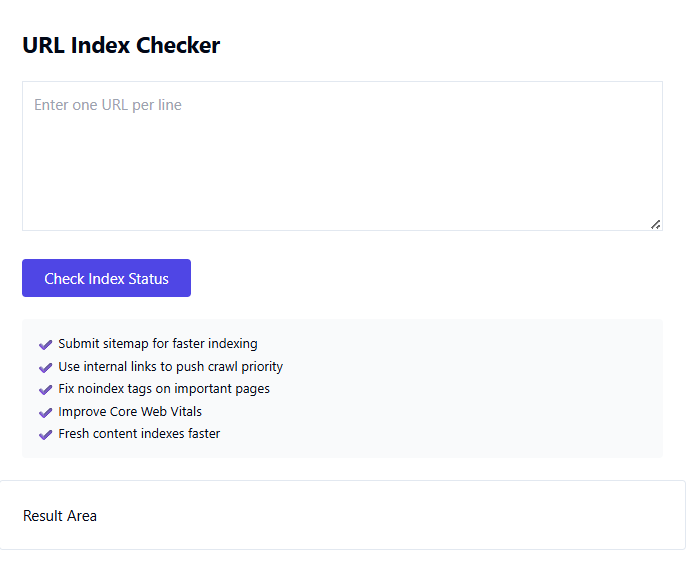
The TaskHug Google Index Checker allows you to enter a URL, instantly verify index status, view results in the result area, and identify pages that require submission or optimization. It is simple, fast, and designed for bloggers, SEO professionals, agencies, ecommerce website owners, and digital marketers.
How to Use the Google Index Checker (Step-by-Step Guide)
Step 1: Visit the Tool Page. Open your browser and go to http://taskhug.com/tools/seo-tools/url-index-checker
Step 2: Enter the Page URL. In the input field, enter the full URL you want to check. Make sure you include https:// and use the exact page link.
Step 3: Click the Check Button. Press the “Check Index” button to start the process.
Step 4: Review Index Status. The tool will display the result in the “Result Area,” showing whether the page is indexed or not indexed by Google.
Step 5: Take Action if Not Indexed. If your page is not indexed, submit the URL in Google Search Console, check for noindex tags, review robots.txt rules, and improve internal linking.
Common Reasons Pages Are Not Indexed
Pages blocked by robots.txt, noindex meta tags, low-quality or thin content, duplicate content issues, crawl errors, slow website performance, or lack of internal links can prevent indexing. Identifying these issues helps resolve visibility problems quickly.
SEO Best Practices to Improve Indexing
Submit your sitemap in Google Search Console, ensure proper internal linking, avoid duplicate content, improve page speed, remove noindex tags when necessary, publish high-quality content, and maintain a clean technical SEO structure. Regularly monitor indexing status for new pages.
Who Should Use This Tool?
The TaskHug Google Index Checker is ideal for bloggers, website owners, ecommerce stores, SEO agencies, content marketers, and startup founders who want to monitor search engine indexing and ensure their content is visible online.
Conclusion
Indexing is the foundation of search engine visibility. Without proper indexing, even high-quality content cannot rank. The TaskHug Google Index Checker provides a quick and reliable way to verify whether your webpages are indexed and ready to appear in search results. Start checking your URLs today at http://taskhug.com/tools/seo-tools/url-index-checker and ensure your content is properly indexed for maximum SEO performance.

