
Broken Link Checker – Complete Guide to Fixing Dead Links & Improving SEO Performance Broken links can silently damage your website’s SEO performance, user experience, and credibility. Whether you manage a blog, business website, eCommerce store, or a growing tool…
Broken Link Checker – Complete Guide to Fixing Dead Links & Improving SEO Performance
Broken links can silently damage your website’s SEO performance, user experience, and credibility. Whether you manage a blog, business website, eCommerce store, or a growing tool platform like TaskHug, regularly checking for broken links is essential for maintaining search engine visibility.
The Broken Link Checker Tool from TaskHug helps you quickly identify dead links on your website so you can fix them before they harm your rankings.
Tool URL:
http://taskhug.com/tools/seo-tools/broken-link-checker
This guide explains what broken links are, why they matter for SEO, and how to use the tool effectively to maintain a healthy website.
What Is a Broken Link?
A broken link (also known as a dead link) is a hyperlink that no longer works. When clicked, it returns errors such as:
- 404 Page Not Found
- 500 Server Error
- 403 Forbidden
- Timeout errors
Broken links may occur due to:
- Deleted pages
- Changed URLs
- Incorrect link formatting
- Website migration issues
- Expired external resources
Search engines consider excessive broken links a sign of poor website maintenance.
Why Broken Links Hurt SEO
Regularly checking and fixing broken links improves:
1. User Experience
Visitors encountering broken pages lose trust and may leave your site.
2. Crawl Efficiency
Search engine bots waste crawl budget on dead URLs instead of indexing important content.
3. SEO Authority Flow
Broken internal links interrupt link equity distribution across your website.
4. Website Credibility
Too many dead links reduce perceived reliability.
A structured broken link audit ensures your website remains optimized and professional.
How to Use the Broken Link Checker (Step-by-Step)
Access the tool here:
http://taskhug.com/tools/seo-tools/broken-link-checker
Follow these structured steps:
Step 1: Open the Broken Link Checker Tool
Visit the TaskHug Broken Link Checker page in your browser.
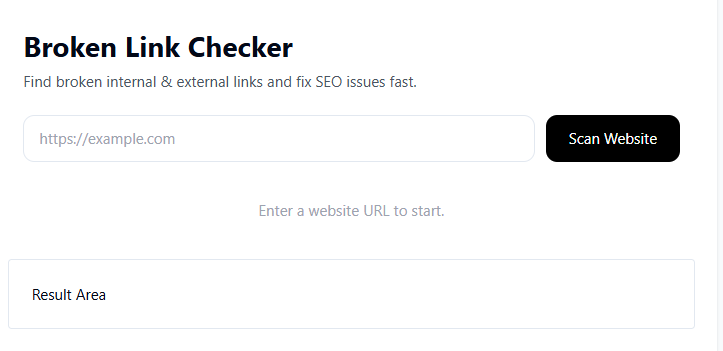
Step 2: Enter Your Website URL
In the input field, enter the full website URL you want to scan.
Example: https://yourwebsite.com
Make sure the domain is correct and publicly accessible.
Step 3: Click “Check Broken Links”
Start the scanning process by clicking the action button.
The tool will begin analyzing your website’s pages and hyperlinks.
Step 4: Scan Process
The system evaluates:
- Internal links
- External links
- HTTP response codes
- Redirect chains
- Error status links
Step 5: Review the Results
After scanning, the tool displays:
- List of broken URLs
- Error codes returned
- Location of broken links
- Status type (internal or external)
Step 6: Fix the Identified Issues
For each broken link, choose one of the following solutions:
- Update the link to the correct URL
- Replace the link with a relevant resource
- Remove the link completely
- Redirect the broken page to an active page
- Restore deleted content if necessary
Step 7: Recheck After Fixing
After making corrections, run the tool again to ensure all issues are resolved.
Regular monitoring ensures long-term SEO stability.
Professional Broken Link Audit Framework
To maximize SEO benefits, follow this structured audit process:
1. Perform Full Website Scan
Run a complete scan of your website using the Broken Link Checker tool.
2. Separate Internal vs External Links
Prioritize fixing internal broken links first because they directly impact your SEO structure.
3. Fix Internal Link Errors
Update navigation links, blog references, and footer links immediately.
You can also use the Sitemap Generator on TaskHug to regenerate updated sitemap files after fixing links.
4. Handle External Broken Links
If external resources are no longer available:
- Replace with similar high-authority sources
- Remove if unnecessary
5. Set Up Redirects for Removed Pages
Use proper 301 redirects for permanently moved pages to preserve SEO value.
6. Improve Technical Health
After fixing links, ensure your site performs efficiently using:
- Website Page Speed Checker
- Google Index Checker
These tools help ensure your site remains crawlable and optimized.
SEO Benefits of Regular Broken Link Monitoring
Using the Broken Link Checker consistently provides:
- Improved crawl budget efficiency
- Better internal linking structure
- Enhanced user retention
- Higher trust signals
- Reduced bounce rates
- Stronger domain authority flow
Search engines reward technically sound websites.
Internal Linking Strategy for TaskHug
To strengthen your SEO ecosystem, connect the Broken Link Checker with other relevant TaskHug tools:
Primary Tool:
- Broken Link Checker
Related SEO Tools to Link Contextually:
- SEO Competitor Analysis Tool
- Google Rank Tracker
- Keyword Density Checker
- Meta Tag Generator
- Backlink Checker
- Domain Authority Checker
- Sitemap Generator
- Google Index Checker
- Website Page Speed Checker
Use descriptive anchor phrases such as:
- check broken links
- analyze competitor SEO
- track keyword rankings
- optimize meta tags
- improve technical SEO
This builds a structured topic cluster around SEO maintenance and website health.
Who Should Use the Broken Link Checker?
This tool is essential for:
- Bloggers
- Website owners
- SEO professionals
- Digital marketing agencies
- Affiliate marketers
- E-commerce stores
- Educational institutions
- Corporate websites
Any website with internal and external links requires routine broken link monitoring.
Advanced Tips for Preventing Broken Links
- Avoid hardcoding outdated URLs.
- Regularly update external references.
- Monitor after website migrations.
- Use structured internal linking practices.
- Recheck links after content edits.
- Schedule monthly broken link audits.
Preventive maintenance is easier than fixing SEO damage later.
Conclusion
Broken links negatively impact both user experience and search engine rankings. Regular audits ensure your website remains technically sound, professional, and optimized for growth.
The TaskHug Broken Link Checker helps you:
- Identify dead links
- Fix internal linking errors
- Improve SEO structure
- Maintain website credibility
- Enhance crawl efficiency
Start scanning your website today:
http://taskhug.com/tools/seo-tools/broken-link-checker
When combined with other TaskHug SEO tools, broken link monitoring becomes a critical part of your long-term SEO success strategy.

