
Backlink Checker – Analyze Your Website’s Link Profile Backlinks remain one of the strongest ranking factors in search engine algorithms. Understanding who links to your website helps improve domain authority, organic rankings, and overall SEO performance. The TaskHug Backlink Checker…
Backlink Checker – Analyze Your Website’s Link Profile
Backlinks remain one of the strongest ranking factors in search engine algorithms. Understanding who links to your website helps improve domain authority, organic rankings, and overall SEO performance. The TaskHug Backlink Checker allows you to analyze backlinks quickly and efficiently. Access the tool here: http://taskhug.com/tools/seo-tools/ This guide explains what a backlink checker is, why backlinks matter for SEO, and how to use the TaskHug Backlink Checker effectively.
What Is a Backlink Checker?
A Backlink Checker is an SEO tool that analyzes inbound links pointing to your website. It helps identify referring domains, link sources, and backlink opportunities. Monitoring backlinks is essential for maintaining a healthy link profile and avoiding harmful or spammy links.
Why Backlinks Matter for SEO
Backlinks act as votes of trust from other websites. High-quality backlinks improve domain authority, increase search engine trust, boost keyword rankings, drive referral traffic, strengthen brand visibility, and support long-term SEO growth. However, low-quality or toxic backlinks can negatively impact rankings, which makes backlink monitoring critical.
Features of TaskHug Backlink Checker
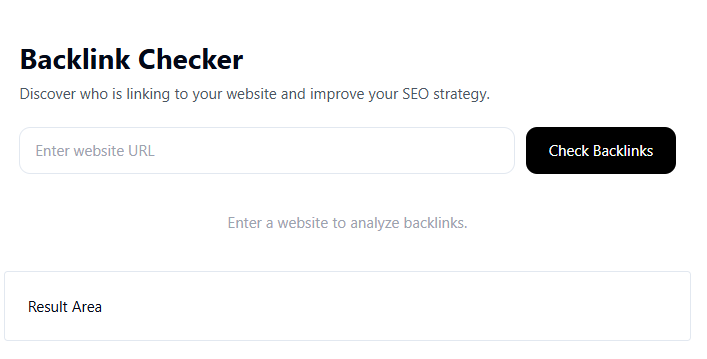
The TaskHug Backlink Checker allows you to enter a website URL, analyze incoming backlinks, view backlink data in the result area, evaluate link sources for SEO strategy improvement, and monitor link-building progress. The tool is simple, fast, and designed for SEO professionals, bloggers, and website owners.
How to Use the Backlink Checker (Based on Your Tool Interface)
Step 1: Enter Website URL. In the input field labeled “Enter website URL,” type the full domain you want to analyze.
Step 2: Click Check Backlinks. Press the “Check Backlinks” button to start the analysis.
Step 3: Review Results. The tool will display backlink information in the “Result Area.” This helps you evaluate who is linking to your website and assess SEO strength.
Step 4: Improve Your SEO Strategy. Use the backlink data to identify high-quality referring domains, remove toxic backlinks if necessary, and build new strategic links.
SEO Best Practices for Backlink Optimization
Focus on earning backlinks from high-authority websites, prioritize relevant niche links, diversify anchor text naturally, avoid buying spammy backlinks, monitor backlink growth regularly, and combine backlink strategy with strong content marketing. Quality always outweighs quantity in link building.
Common Mistakes to Avoid
Avoid relying solely on quantity of backlinks, ignoring toxic links, building links from irrelevant websites, using over-optimized anchor text, or neglecting backlink monitoring over time. Consistent analysis ensures long-term SEO success.
Who Should Use This Tool?
The TaskHug Backlink Checker is ideal for SEO specialists, bloggers, ecommerce website owners, digital marketers, startup founders, affiliate marketers, and content creators looking to improve search rankings and domain authority.
Conclusion
Backlinks are a critical component of modern SEO strategy. Without monitoring and analyzing your link profile, it is difficult to compete in search engine rankings. The TaskHug Backlink Checker provides a simple and efficient way to analyze inbound links and strengthen your SEO foundation. Start analyzing your backlinks today at http://taskhug.com/tools/seo-tools/ and take control of your website’s search performance.

