
Advanced Plagiarism Checker – Ensure 100% Original Content Original content is essential for SEO success, academic integrity, and brand credibility. Duplicate or copied content can harm search rankings, reduce trust, and lead to penalties. The TaskHug Advanced Plagiarism Checker helps…
Advanced Plagiarism Checker – Ensure 100% Original Content
Original content is essential for SEO success, academic integrity, and brand credibility. Duplicate or copied content can harm search rankings, reduce trust, and lead to penalties. The TaskHug Advanced Plagiarism Checker helps you detect duplicate content quickly and maintain high originality standards. Access the tool here: http://taskhug.com/tools/seo-tools/ This guide explains what plagiarism checking is, why it matters for SEO, and how to use the TaskHug Advanced Plagiarism Checker effectively.
What Is a Plagiarism Checker?
A plagiarism checker scans your content and compares it against existing web content to identify duplicate or similar text. It highlights potential matches and helps ensure your content is unique before publishing. This is critical for bloggers, students, content writers, and businesses.
Why Content Originality Matters for SEO
Search engines prioritize unique and valuable content. Duplicate content can lower rankings, reduce indexing priority, damage brand reputation, decrease organic traffic, and trigger algorithmic penalties. Maintaining high originality improves trust, authority, and search engine visibility.
Features of TaskHug Advanced Plagiarism Checker
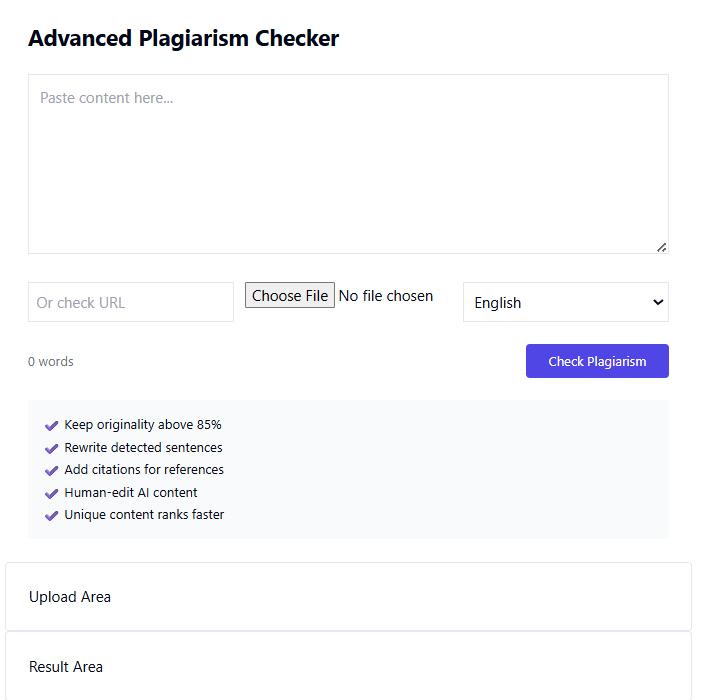
The TaskHug Advanced Plagiarism Checker allows you to paste content directly, check content via URL, upload files for scanning, select language preference, view word count instantly, analyze originality percentage, and review results in a detailed result area. The tool is designed for SEO professionals, bloggers, students, and digital marketers.
How to Use the Advanced Plagiarism Checker (Based on Your Tool Interface)
Step 1: Paste Your Content. In the large text box labeled “Paste content here,” enter the article, blog post, or text you want to check. The word count will update automatically.
Step 2: Or Check via URL. Use the “Or check URL” field to analyze content published on a webpage.
Step 3: Upload File (Optional). Click “Choose File” to upload a document for plagiarism scanning.
Step 4: Select Language. Choose the appropriate language from the dropdown menu to improve detection accuracy.
Step 5: Click Check Plagiarism. Press the “Check Plagiarism” button to start scanning.
Step 6: Review Results. The tool will display findings in the “Result Area” and upload section, showing originality level and detected similarities.
Best Practices for Maintaining Originality
Keep originality above 85 percent, rewrite detected duplicate sentences, add proper citations for references, human-edit AI-generated content, and ensure all published material provides unique value. High-quality original content ranks faster and performs better in search results.
Common Mistakes to Avoid
Avoid copying content from competitors, publishing AI-generated content without editing, ignoring citation requirements, reusing old blog posts without modification, or failing to check plagiarism before publishing.
Who Should Use This Tool?
The TaskHug Advanced Plagiarism Checker is ideal for bloggers, students, academic researchers, content marketers, SEO agencies, ecommerce website owners, and freelance writers who need reliable originality verification.
Conclusion
Content originality is a foundational element of successful SEO and digital credibility. Publishing unique and valuable content improves rankings, builds authority, and enhances user trust. The TaskHug Advanced Plagiarism Checker provides a fast and efficient way to detect duplicate content and maintain high originality standards. Start checking your content today at http://taskhug.com/tools/seo-tools/ and protect your website from plagiarism risks.

