
Internal Link Builder – Strengthen Website Structure & Boost SEO Rankings Internal linking is one of the most powerful yet underutilized SEO strategies. A strong internal link structure helps search engines understand your website hierarchy, distribute authority, and improve keyword…
Internal Link Builder – Strengthen Website Structure & Boost SEO Rankings
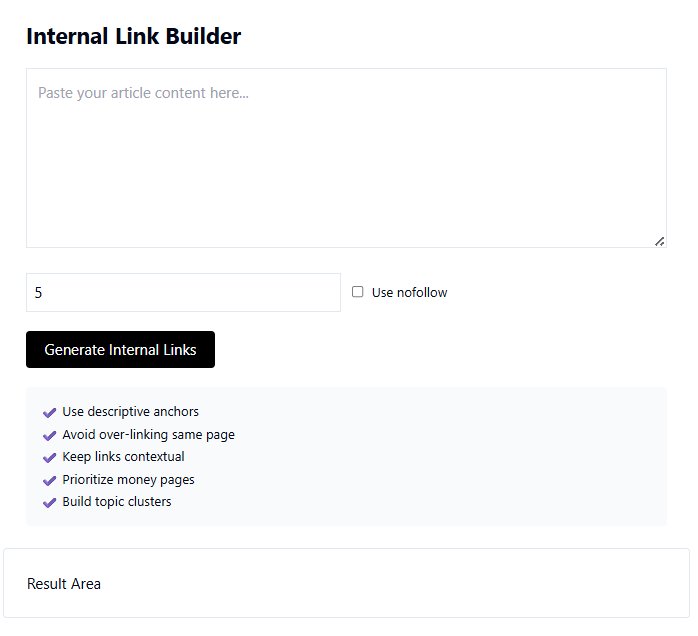
Internal linking is one of the most powerful yet underutilized SEO strategies. A strong internal link structure helps search engines understand your website hierarchy, distribute authority, and improve keyword rankings. An Internal Link Builder simplifies this process by identifying linking opportunities and structuring connections strategically.
The Internal Link Builder Tool at
http://taskhug.com/tools/seo-tools/internal-link-builder
is designed to help website owners create optimized internal links that improve crawlability, authority flow, and ranking performance.
This professional guide explains what internal linking is, why it matters, and how to use the TaskHug tool step by step.
What is Internal Linking?
Internal linking refers to hyperlinks that connect one page of your website to another page on the same domain.
It helps:
- Improve search engine crawling
- Distribute page authority
- Reduce orphan pages
- Enhance user navigation
- Increase time on site
- Improve keyword relevance
A structured internal linking system is essential for long-term SEO success.
Why Internal Linking is Critical for SEO
Search engines use internal links to:
- Discover new content
- Understand page relationships
- Identify pillar pages
- Evaluate content hierarchy
- Pass link equity between pages
Without proper internal linking, even high-quality content may struggle to rank.
How to Use TaskHug Internal Link Builder (Step-by-Step Guide)
Follow these steps to build optimized internal links:
Step 1: Visit the Tool Page
Open the official tool:
http://taskhug.com/tools/seo-tools/internal-link-builder
Step 2: Enter Your Website URL
Input your domain or a specific webpage URL.
Step 3: Add Target Keywords (Optional if available)
Provide primary keywords to generate context-relevant link suggestions.
Step 4: Click “Build Links”
Start the analysis process.
Step 5: Review Link Suggestions
The tool generates:
- Relevant internal linking opportunities
- Suggested anchor texts
- Recommended source pages
- Target page suggestions
- Link structure insights
Step 6: Implement Suggested Links
Add contextual links within:
- Blog content
- Service pages
- Pillar articles
- Product pages
Ensure links are natural and add value to the reader.
Best Practices for Internal Linking
To maximize SEO performance:
- Link from high-authority pages to important pages
- Use keyword-rich but natural anchor text
- Avoid excessive links on a single page
- Connect related topic clusters
- Fix orphan pages
- Maintain logical site hierarchy
You can further optimize your site using additional TaskHug tools:
- Full SEO Audit Tool
http://taskhug.com/tools/seo-tools/seo-audit - Content Gap Analyzer
http://taskhug.com/tools/seo-tools/content-gap-analyzer - AI Keyword Clustering Tool
http://taskhug.com/tools/seo-tools/keyword-cluster - Google Rank Tracker
http://taskhug.com/tools/seo-tools/google-rank-tracker - Website Health Checker
http://taskhug.com/tools/seo-tools/website-health-checker
Combining internal linking with these tools strengthens your entire SEO strategy.
How Internal Link Builder Supports Content Clusters
Internal linking is essential for building topic clusters:
- Create a pillar page targeting a broad keyword.
- Publish supporting articles for subtopics.
- Link all supporting pages back to the pillar page.
- Interlink related supporting articles.
This structure improves topical authority and ranking potential.
Internal Linking Strategy for TaskHug
To improve SEO authority across TaskHug, implement this structured linking approach:
1. Interconnect All SEO Tools
Ensure every SEO tool page links to:
- Internal Link Builder
- Programmatic SEO Page Generator
- Affiliate SEO Analyzer
- SEO Competitor Analysis Tool
- Google SERP Analyzer
- Website Traffic Estimator
- Backlink Checker
- Domain Authority Checker
- Broken Link Checker
- Schema Markup Generator
This creates a powerful SEO tools cluster.
2. Promote Utility Tools Contextually
Within blog posts, naturally link to:
- Image Compressor (optimize blog images)
- Video Trimmer (optimize embedded videos)
- EMI Calculator (finance niche content)
- BMI Calculator (health niche content)
- YouTube SEO Optimizer (video creators)
This strengthens topical authority across different categories.
3. Use Strategic Anchor Text
Examples:
- “improve internal link structure”
- “build SEO-friendly internal links”
- “optimize website hierarchy”
- “analyze content gaps”
Avoid generic phrases and ensure contextual relevance.
Who Should Use Internal Link Builder?
This tool is ideal for:
- SEO professionals
- Bloggers
- Affiliate marketers
- E-commerce website owners
- SaaS platforms
- Content strategists
- Digital marketing agencies
If your website has multiple pages, internal linking should be part of your SEO strategy.
Common Internal Linking Mistakes to Avoid
- Using generic anchor text repeatedly
- Linking to irrelevant pages
- Creating too many links on a single page
- Ignoring orphan pages
- Not updating internal links after publishing new content
A strategic approach always outperforms random linking.
How Internal Linking Improves Rankings
When you implement a strong internal linking system:
- Search engines crawl pages faster
- Important pages receive more authority
- Keyword relevance increases
- Bounce rate decreases
- Organic rankings improve
Internal linking is one of the most cost-effective SEO optimization techniques.
Conclusion
The Internal Link Builder is a powerful SEO tool that helps structure your website for better rankings, improved crawlability, and stronger authority distribution.
Start optimizing your internal link strategy using:
http://taskhug.com/tools/seo-tools/internal-link-builder
Combine it with other TaskHug SEO and productivity tools to build a structured, scalable, and performance-driven SEO ecosystem for long-term growth.

